BoltBill Pro guide
Zoho Invoice Alternative for Canadian Small Business
Looking for a Zoho Invoice alternative in Canada? Compare tax handling, CRA compliance, holdbacks, and prompt-payment workflows for trades and consultants.

The best Zoho Invoice alternative for Canadian sole proprietors, trades, and independent consultants is software designed specifically around Canada Revenue Agency (CRA) rules and provincial billing workflows. While Zoho Invoice offers an accessible zero-dollar entry point, it lacks native handling for provincial tax combinations (like PST and QST), statutory construction holdbacks under provincial prompt payment laws, and clear labour-and-materials itemization needed for Canadian audits. Platforms like BoltBill Pro remove that friction by generating invoices that align directly with Canadian tax and contracting requirements.
The Core Verdict: Why Canadians Outgrow Zoho Invoice
Zoho Invoice has built a large international user base because its standalone invoicing tier is free. For a web developer billing flat-rate hourly fees to a single client in the United States, that setup functions without issue. Problems arise once you operate inside the Canadian tax system or bill physical work within provinces that separate goods from services.
First, Zoho operates primarily as an entry hook for the broader Zoho ecosystem. It nudges users toward paid add-ons or their complete Zoho Books package once workflows become complex. Second, configuring multi-jurisdictional Canadian sales taxes inside Zoho requires manual setup for every tax combination. If you work from Alberta but bill a project in British Columbia or Quebec, reconciling provincial rates requires complex tax groups that often break when syncing with standard Canadian banking feeds.
Third, Zoho Invoice offers no built-in mechanics for the statutory lien holdbacks required on Canadian job sites. If you are a trade contractor, specialty consultant, or engineer invoicing under the Alberta Prompt Payment and Construction Lien Act (PPCLA), Zoho forces you to manually calculate negative line items. That approach obscures your tax basis and creates audit exposure with the CRA.
What Actually Matters on a Canadian Invoice
Invoicing in Canada involves distinct regulatory requirements that generic international software packages treat as an afterthought. Choosing an invoicing system requires assessing four specific operating realities.
1. CRA Invoicing and Business Number Rules
Under the CRA Excise Tax Act, any business registered for the GST/HST must display specific information on its invoices for clients to claim Input Tax Credits (ITCs). If an invoice exceeds $100, the CRA requires your legal business name, invoice date, total amount payable, and your 9-digit Business Number with the GST/HST program identifier (e.g., 123456789 RT 0001).
For invoices of $500 or more, the CRA also requires the recipient's name, a brief description of goods or services, terms of payment, and an explicit breakdown showing whether tax is charged per item or calculated on the subtotal. Missing these mandatory elements can cause your commercial clients to reject your bills or have their ITCs disallowed during a CRA audit.
2. Provincial Sales Tax Jurisdictions
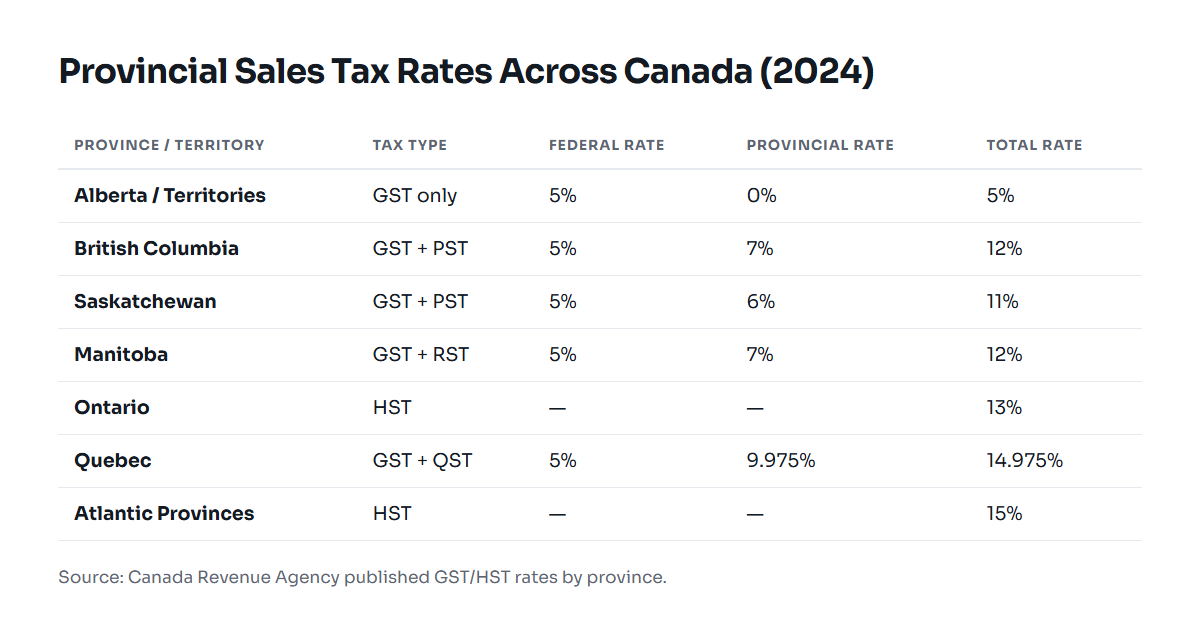
Every province applies sales tax differently. Invoicing a client across provincial lines means applying the place-of-supply rules defined by the CRA:
- Alberta, Northwest Territories, Nunavut, Yukon: 5% GST only.
- Ontario: 13% Harmonized Sales Tax (HST).
- New Brunswick, Newfoundland and Labrador, Nova Scotia, Prince Edward Island: 15% HST.
- British Columbia: 5% GST plus 7% Provincial Sales Tax (PST) on taxable goods, software, and related services.
- Saskatchewan: 5% GST plus 6% PST.
- Quebec: 5% GST plus 9.975% Quebec Sales Tax (QST), administered by Revenu Québec.
- Manitoba: 5% GST plus 7% Retail Sales Tax (RST).
Your software must apply these exact combinations automatically based on where your service is delivered or where your client takes delivery of materials. Manual tax entry introduces calculation errors that compound across a fiscal year.
3. Statutory Holdbacks and Prompt Payment Timelines
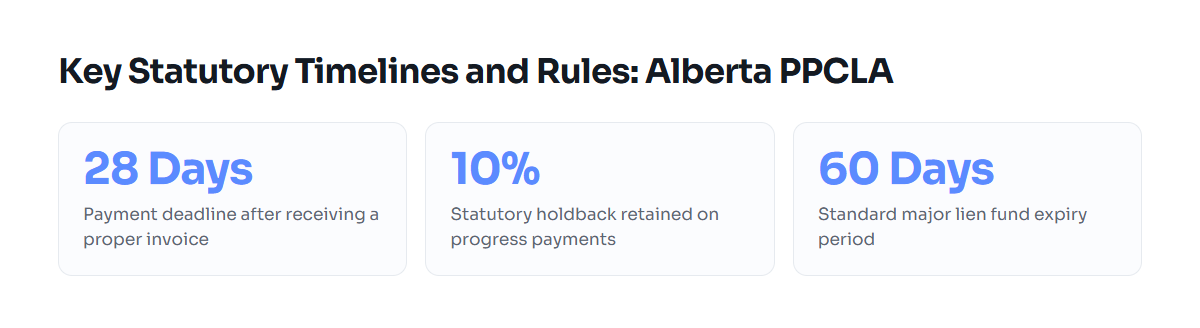
If you bill on physical project sites or provide design services related to real property improvements, provincial lien legislation governs how you get paid. In Alberta, the Prompt Payment and Construction Lien Act (PPCLA) establishes strict requirements:
- A contractor must issue a "proper invoice" every 31 days once work commences.
- The owner must pay that proper invoice within 28 calendar days unless a formal notice of dispute is issued within 14 days.
- Every progress claim must account for a 10% statutory holdback retained in a major lien fund until the statutory lien period expires (ordinarily 60 days in Alberta, or 90 days for concrete-specific or oil and gas improvements).
International tools like Zoho Invoice do not calculate statutory holdbacks out of the box. Deducting a 10% holdback as an arbitrary negative line item creates confusion: does the GST apply to the gross progress bill, or the net amount payable? Under Canadian tax rulings, GST is calculated on the full value of the work completed before the holdback is deducted, with payment of the tax on the holdback deferred until the holdback itself is legally payable. Software that does not separate holdbacks cleanly can trigger tax miscalculations on both sides of the contract.
4. CRA Record-Retention Rules
Subsection 286(1) of the Excise Tax Act and Section 230 of the Income Tax Act require Canadian businesses to retain all books, records, invoices, and receipts for six years from the end of the last tax year to which they relate. If an international cloud platform locks your data, changes terms, or removes free tiers, retrieving historical compliance archives can become difficult.
Head-to-Head Comparison: Zoho Invoice vs. Dedicated Canadian Billing
The following table compares standard cloud billing systems with software designed specifically for the Canadian operating environment.
| Capability | Zoho Invoice | BoltBill Pro | Generic Accounting Suite |
|---|---|---|---|
| Base Pricing | Free (limited features) | Fixed flat-fee / predictable | $30 to $90+ / month |
| CRA Business Number & ITC Format | Manual field setup required | Native, automated fields | Native, automated fields |
| Provincial Tax Engine (PST/QST/HST) | Manual multi-rate tax groups | Automatic place-of-supply rules | Automatic (higher-tier plans) |
| Statutory Holdback Tracking (e.g., 10%) | Not supported (manual workaround) | Built-in holdback deductions | Requires enterprise add-ons |
| Prompt Payment Dispute Tracking | No | Built-in calendar tracking | No |
| Labour vs. Materials Itemization | Manual line items only | Dedicated cost separation | Standard line items |
| 6-Year CRA Export Archive | Manual CSV/PDF downloads | One-click compliance backup | Varies by vendor |
For a detailed breakdown of total costs across standard platforms, review our Invoicing Software Pricing Comparison for Canadians.
Worked Billing Example: Alberta Trade Contractor
To see where software makes a practical difference, consider an electrical contractor in Calgary billing a commercial tenant improvement project under a City of Calgary commercial permit.
The sub-contractor completes the rough-in stage and submits Progress Claim #2. The contract details are as follows:
- Labour: 80 hours at $95.00/hour = $7,600.00
- Materials (conduit, wire, sub-panels): $4,400.00
- Total Value of Work Completed This Period: $12,000.00
Under the Alberta PPCLA, the invoice must reflect the 10% statutory lien holdback. Under CRA rules, the 5% GST applies to the total value of the work completed, but the payment terms for the holdback portion remain deferred:
- Gross Subtotal: $12,000.00
- Less 10% Statutory Holdback: -$1,200.00
- Net Work Payable: $10,800.00
- 5% GST on Gross Work ($12,000.00 × 5%): $600.00
- Total Due on Current Billing: $11,400.00
- Holdback Held to Date: $1,200.00 (Due upon expiry of the 60-day lien period)
In Zoho Invoice, generating this breakdown requires setting up custom items, calculating the negative $1,200.00 manually, and verifying that the tax engine does not apply GST solely to the $10,800.00 net figure. In software built for Canadian contracting, you enter the labour, enter the materials, check the 10% statutory holdback box, and the system formats the claim in full compliance with both the CRA and the PPCLA.
How to Write Payment Details for Canadian Clients
Every Canadian invoice should display clean payment instructions to prevent payment disputes. Because Interac e-Transfer is standard across Canadian commercial operations, format your remittance section clearly:
Payment Terms: Net 28 days (Pursuant to Alberta PPCLA).
Electronic Transfer: Send Interac e-Transfers to billing@yourcompany.ca (Auto-deposit enabled).
Direct Deposit (EFT): Institution: 003, Transit: 12345, Account: 1234567.
Remittance Inquiries: 403-555-0199 or accounting@yourcompany.ca.
Who Each Option Is Genuinely Right For
Neither software suits every single business. Selecting the correct billing platform requires evaluating your company's actual operating scope.
Zoho Invoice Is the Right Choice If:
- You run a solo digital business billing primarily in US dollars to non-Canadian clients where Canadian sales tax does not apply.
- Your billing is strictly time-based with no physical materials, job-site permits, or progress billings.
- You already run Zoho CRM, Zoho Projects, or Zoho Mail, and you want unified sign-on without purchasing external tools.
- You have simple bookkeeping needs and do not mind setting up manual tax rules for individual provinces.
BoltBill Pro Is the Right Choice If:
- You run an independent consultancy, engineering practice, or trade business operating under Canadian tax rules.
- You invoice clients in multiple provinces and need automatic GST, HST, PST, and QST rate management without manual overrides.
- You bill construction, technical, or trade projects subject to provincial prompt payment laws and 10% statutory holdbacks.
- You want straightforward software without the upsells and platform complexity of massive software ecosystems. For teams evaluating alternatives to major legacy platforms, read our analysis on QuickBooks Alternative for Small Business Canada.
How to Switch Invoicing Systems Without Disrupting Cash Flow
Migrating away from Zoho Invoice does not require downtime if you follow a sequential transition plan.
- Export Your Client Database: In Zoho Invoice, navigate to Contacts and export your client list to a CSV file. Verify that company legal names, billing addresses, and primary contact emails are complete.
- Archive Open Invoices and Records: Download PDF copies of all paid and outstanding invoices generated in Zoho. The CRA requires you to keep these records for six years. Store an offline backup organized by calendar year.
- Establish Your Canadian Tax Settings: In your new billing platform, configure your legal entity name, your 9-digit Business Number, and your provincial tax accounts. Set your default province to automate the 5% GST or applicable provincial rates.
- Set Up Progress Claim and Holdback Defaults: If you work in construction or related fields, configure your default statutory holdback (e.g., 10% in Alberta) and set standard payment terms to match the governing prompt payment timeline (28 calendar days for a proper invoice).
- Recreate Active Contracts: Re-enter ongoing projects with remaining billing balances. Record previously billed progress amounts so future claims correctly display the cumulative totals, previous billings, and accumulated holdback amounts.
- Notify Active Clients: Send your next billing cycle with a brief note highlighting any updated remittance details, such as new direct-deposit accounts or automated e-Transfer addresses.
Common questions
Why is Zoho Invoice free, and what is the catch?
Zoho Invoice is provided for free as a customer-acquisition funnel for the broader Zoho ecosystem. While functional for basic international billing, users with complex Canadian sales tax requirements, construction holdbacks, or multi-currency reconciliations are steered toward paid upgrades like Zoho Books.
What must appear on a CRA-compliant invoice in Canada?
For sales over $500, the CRA requires your legal business name, date, invoice number, 9-digit Business Number with GST/HST identifier, recipient name, description of services or materials, payment terms, and an itemized breakdown of applicable taxes.
How does sales tax apply to statutory holdbacks in Alberta?
Under CRA excise tax policy, GST applies to the gross value of work completed before the 10% statutory holdback is deducted. Payment of the tax on the holdback amount is deferred until the holdback itself becomes legally payable upon expiry of the lien period.
Can I use Zoho Invoice for progress billing with holdbacks?
Zoho Invoice does not feature native holdback accounting. You must calculate negative line items manually, which frequently leads to errors on the taxable subtotal and complicates cumulative progress-claim tracking required under provincial lien acts.
How long do I need to keep historical invoices after leaving Zoho?
The CRA requires Canadian businesses to retain all books, records, and supporting invoices for six years from the end of the tax year to which they apply. Export PDF backups of all historical invoices before closing your Zoho account.
Related guides
QuickBooks Alternative for Small Business Canada
A practical comparison of Canadian invoicing alternatives to QuickBooks for contractors, freelancers, and small operations.
Invoicing Software Pricing Comparison for Canadians
A transparent look at invoicing software pricing models, hidden fees, and compliance costs for Canadian consultants, trades, and professional firms.
How to Charge GST on Invoices: Canadian Guide
A straightforward guide on how to calculate, display, and remit GST on Canadian invoices without running afoul of CRA rules.
Progress Draw Payments in Canadian Construction
A complete guide to progress draw payments, statutory holdbacks, and prompt payment rules for Canadian contractors and trades.