BoltBill Pro guide
QuickBooks Alternative for Small Business Canada
Looking for a QuickBooks alternative for small business in Canada? Compare simple invoicing tools against accounting suites for GST, holdbacks, and taxes.

The best QuickBooks alternative for a Canadian small business depends on whether you need a full double-entry accounting ledger or straightforward invoicing that handles Canadian sales tax and construction rules. For operators who only need to bill clients, track sales taxes like GST and HST, and get paid without payroll or complex inventory modules, dedicated invoicing software like BoltBill Pro provides a direct, low-overhead alternative to QuickBooks Online.
Choosing Between Invoicing Software and Accounting Suites
Small business owners in Canada often default to QuickBooks because it is the most advertised name on the market. However, QuickBooks Online is built around a double-entry general ledger. A general ledger tracks debits, credits, bank reconciliations, asset depreciation, and chart-of-accounts structures. If you run a retail shop with physical inventory or employ twenty staff members on internal payroll, a full accounting suite is necessary. If you are an independent consultant, subtrade, general contractor, or freelance designer, that complexity works against you.
When you run a service business, you need software to produce clean, professional bills, track receivables, and comply with Canadian federal and provincial tax laws. You do not need to spend thirty minutes reconciling an automated bank feed error every Tuesday. Most independent operators hand their year-end statements and raw expense records to an external chartered professional accountant (CPA). Paying for an expansive, complicated system every month simply to send ten or twenty invoices creates administrative drag without operational benefit.
Understanding this distinction prevents small firms from buying features they will never touch. For a detailed breakdown of how different platforms price their tools for the Canadian market, review our guide to Invoicing Software Pricing Comparison for Canadians.
What Canadian Billing Rules Demand from Invoicing Software
Operating a business in Canada introduces specific legal and statutory billing requirements. Your billing system must support these rules automatically, or you risk CRA audit penalties and payment delays from commercial clients.
CRA Invoicing and Sales Tax Requirements
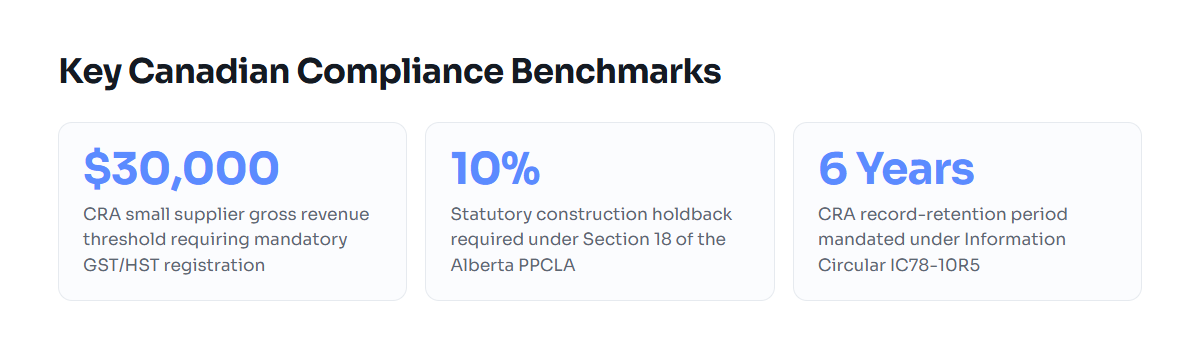
The Canada Revenue Agency (CRA) requires businesses to register for a Goods and Services Tax / Harmonized Sales Tax (GST/HST) account once their gross taxable revenues exceed the small supplier threshold of $30,000 across four consecutive calendar quarters. Once registered, your invoice is a formal legal tax document under the Excise Tax Act.
For sales over $30, the CRA mandates that an invoice must state your business or legal operating name, the invoice date, and your 9-digit Business Number with the RT program identifier. For sales of $150 or more, the CRA also requires the recipient's name, a brief description of the goods or services, terms of payment, and an explicit breakdown showing either the total tax charged per rate or a statement that tax is included in the price. Depending on the province of supply, you must bill:
- 5% GST in Alberta, British Columbia, Manitoba, Northwest Territories, Nunavut, Saskatchewan, and Yukon.
- 13% HST in Ontario.
- 15% HST in New Brunswick, Newfoundland and Labrador, Nova Scotia, and Prince Edward Island.
- 5% GST alongside provincial sales taxes: 7% PST in British Columbia, 6% PST in Saskatchewan, 7% RST in Manitoba, or 9.975% QST in Quebec.
Your billing tool must separate these taxes line by line. Combining them into a generic tax box makes input tax credit (ITC) claims difficult for your commercial clients and creates reconciliation headaches for your accountant.
Alberta Prompt Payment Rules and Holdbacks
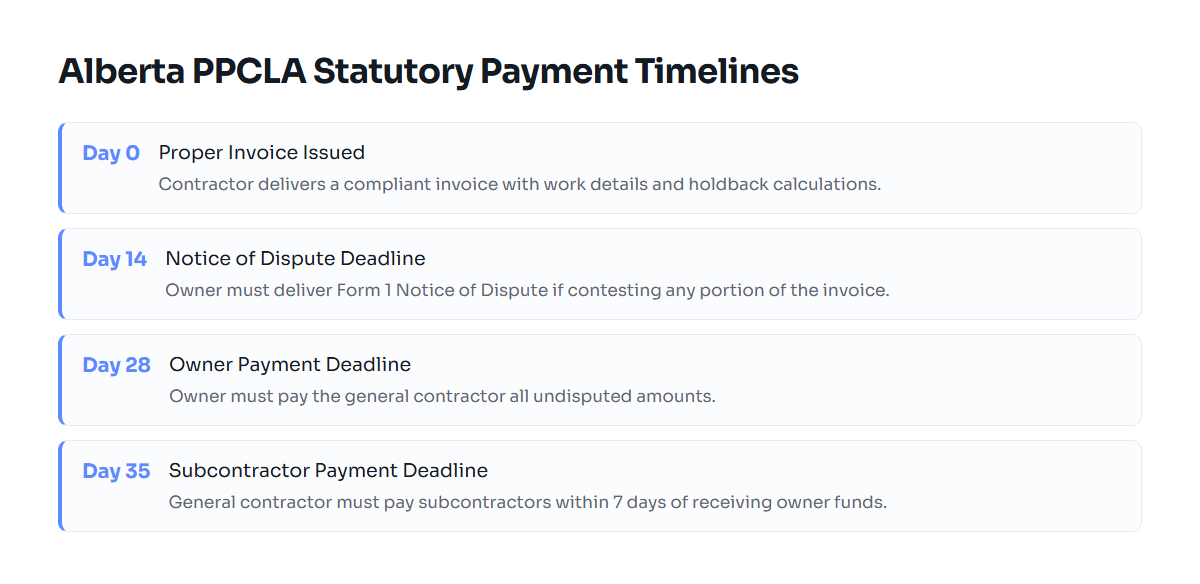
For trade contractors and engineering service providers in Alberta, billing practices are governed by the Prompt Payment and Construction Lien Act (PPCLA). Under the PPCLA, delivering a formal "proper invoice" triggers statutory payment deadlines. Owners must pay general contractors within 28 calendar days of receiving a proper invoice, and contractors must pay subcontractors within 7 calendar days after receiving payment.
Additionally, Section 18 of the PPCLA mandates a 10% statutory holdback on the value of work or materials supplied under a contract. Invoicing software built for Canadian contractors must track this 10% retention separately from the current payable balance. If your software cannot deduct holdbacks clearly, your invoice can be disputed, resetting the statutory 28-day payment clock.
CRA Record Retention
Under CRA memorandum IC78-10R5, you must retain all books, records, and supporting invoices for a minimum of six years from the end of the last tax year to which they relate. Software that stores your invoices in proprietary or locked databases exposes you to risk if you close your subscription. You need software that allows clean PDF export and straightforward data archiving.
QuickBooks Online Compared to Dedicated Invoicing Software
To evaluate QuickBooks alternatives for your Canadian operation, compare the core capabilities that impact your daily workflow:
| Operational Metric | QuickBooks Online | Dedicated Invoicing Software | Spreadsheets (Excel/Sheets) |
|---|---|---|---|
| Primary Purpose | Complete double-entry accounting suite | Direct client invoicing and payment collection | Freeform manual calculation |
| Canadian Tax Support | Configurable GST/HST/PST/QST rules | Native Canadian tax rates and multi-province rules | Manual entry per invoice |
| Holdback & Progress Claims | Requires manual journal entries or high-tier workarounds | Direct percentage retention tracking | Requires custom, error-prone formulas |
| Setup Time | 3 to 8 hours (Chart of Accounts, Bank Links) | 10 to 15 minutes | 1 to 2 hours per custom template |
| Learning Curve | Steep; requires bookkeeping literacy | Low; straightforward for first-time business owners | Low to moderate |
| CRA Compliance Format | Standardized | Standardized CRA-compliant templates | High risk of missing required fields |
Setup and Maintenance Overhead
QuickBooks requires you to set up a chart of accounts, link bank feeds, classify income categories, and manage clearing accounts. When bank feeds disconnect or duplicate entries appear, fixing them requires specialized bookkeeping knowledge. In contrast, dedicated invoicing software focuses purely on the billing workflow. You enter your client information, list the line items, apply the correct provincial tax rate, and issue the bill. You bypass bank reconciliation inside the tool and leave general ledger reporting to your tax accountant.
Progress Billing and Trade Claims
QuickBooks handles standard flat-rate services well, but configuring progressive billing with statutory holdbacks is notoriously clumsy. Trade contractors operating under provincial lien legislation often have to invent workarounds using negative line items to display a 10% holdback. Dedicated platforms designed with contractors and consultants in mind display contract sums, percentage-complete values, previous billings, current claims, and holdback balances in clear fields that comply with provincial lien acts.
Worked Example: Commercial Contractor Billing in Alberta
Consider a Calgary mechanical contractor performing an HVAC upgrade on a commercial property. The total contract value is $30,000 plus 5% GST. The work spans three months, and the agreement dictates progressive billing under the Alberta PPCLA.
The contractor submits a proper invoice for Month 1 based on 40% completion:
- Total Contract Value: $30,000.00
- Current Work Completed (40%): $12,000.00
- Less Previous Billings: $0.00
- Value of Current Claim: $12,000.00
- Less 10% Statutory Holdback: -$1,200.00
- Net Amount Payable Before Tax: $10,800.00
- GST (5% applied to work completed): $600.00
- Total Amount Due for Month 1: $11,400.00
- Holdback Retained to Date: $1,200.00
Under the PPCLA, the owner must pay the $11,400.00 within 28 calendar days. The $1,200.00 holdback remains in the owner's holdback account until the lien period expires after substantial performance. Using general accounting software that lacks holdback tracking often leads contractors to calculate these figures in external spreadsheets, defeating the purpose of paying for an expensive subscription.
Who Each Software Option Is Best Suited For
When QuickBooks Is the Correct Choice
QuickBooks remains an industry standard for businesses that require full-time internal financial controls. You should choose QuickBooks Online if:
- You employ staff on internal payroll and manage payroll deductions, T4 slips, and Records of Employment directly inside the software.
- You carry substantial physical inventory across multiple warehouses and need real-time automated cost-of-goods-sold (COGS) adjustments.
- You have a dedicated in-house bookkeeper who requires an integrated general ledger to produce balance sheets and trial balances monthly.
When Dedicated Invoicing Software Is the Better Choice
For service firms, contractors, solo consultants, and trades, general ledger software creates unneeded friction. Dedicated invoicing software is ideal if:
- You want to issue professional, CRA-compliant bills in under two minutes without bookkeeping configuration.
- You need clear progress billing, milestone billing, or statutory holdback tracking for construction and design work.
- You work with an external accountant at tax season and only need software to track your revenue, customer accounts, and tax collections.
- You want transparent, predictable pricing without sudden subscription tier escalations.
How to Transition Away from QuickBooks
Switching your billing from QuickBooks to a focused alternative does not require complex data migrations. Follow this five-step transition checklist:
- Pick an operational cutover date: The start of a new fiscal quarter or fiscal year is ideal, but the start of any billing month works cleanly for service businesses.
- Export your client contacts: In QuickBooks, navigate to your Customers menu and export the directory to a CSV file. Verify that business names, billing addresses, and contact emails are up to date.
- Archive your historical records: Export your General Ledger, Balance Sheet, Profit and Loss statements, and PDF copies of all paid invoices for the previous six tax years. Store these files securely on an external drive or cloud storage to satisfy CRA record retention rules under IC78-10R5.
- Configure your Canadian tax identifiers: Open your new invoicing account and enter your legal operating name, business address, and 9-digit CRA Business Number with the RT0001 designation. Set your default sales tax based on your home province, and enable out-of-province tax rules for national clients.
- Reconcile outstanding receivables: Settle open accounts receivable inside your old ledger before closing it, or carry the remaining open balances into your new system as opening invoices. Once complete, cancel your recurring accounting suite subscription.
Transitioning to a lightweight platform streamlines your back-office administrative burden, cuts your monthly software expenses, and keeps your client billing accurate and compliant with Canadian law.
Common questions
Do I need a full accounting suite like QuickBooks to file my Canadian small business taxes?
No. Most small businesses, trades, and independent consultants compile revenue reports and expense summaries for an external CPA who files their T2 corporate tax return or T1 sole proprietorship schedule. Dedicated invoicing software tracks all required revenue and sales tax data without the complexity of a full accounting ledger.
What information must appear on a Canadian business invoice according to the CRA?
For sales of $150 or more, the CRA requires your business or operating name, invoice date, 9-digit Business Number with RT identifier, the customer's name, a description of services, the total amount payable, and a clear breakdown showing the rate and amount of GST, HST, or provincial sales taxes charged.
How does statutory holdback work on invoices in Alberta?
Under Alberta's Prompt Payment and Construction Lien Act (PPCLA), owners and contractors must retain 10% of the value of work or materials authorized on each progress invoice. This holdback amount is withheld until the statutory lien period expires after project completion or substantial performance.
Can I use dedicated invoicing software if I have clients across different Canadian provinces?
Yes. Compliant Canadian invoicing software allows you to assign specific tax rates based on the place of supply rules defined by the CRA. For example, an Alberta business billing an Ontario client must apply 13% HST, while billing a client in British Columbia requires 5% GST.
How long must I store old client invoices after canceling QuickBooks?
Under CRA Information Circular IC78-10R5, you must maintain all financial records, books of account, and invoices for at least six years from the end of the tax year to which they apply. Always export your past invoices and financial summaries as PDFs or CSVs before closing your QuickBooks account.
Related guides
Invoicing Software Pricing Comparison for Canadians
A transparent look at invoicing software pricing models, hidden fees, and compliance costs for Canadian consultants, trades, and professional firms.
Contractor Invoice Template for Canada: CRA Rules
A compliant Canadian contractor invoice template meeting CRA GST/HST rules, provincial sales taxes, and Alberta Prompt Payment requirements.
Billing Methods for Consultants, Contractors, and Trades
A complete guide to hourly, fixed-fee, milestone, and progress billing methods for Canadian independent contractors, trades, and consultants.
How to Invoice as a Freelancer in Canada
A complete guide to Canadian freelance invoicing, covering CRA mandatory line items, GST/HST registration rules, provincial tax tables, and payment terms.