BoltBill Pro guide
Subcontractor Invoice Template for Excel in Canada
Download an Excel subcontractor invoice template built for Canadian rules, CRA tax requirements, and Alberta Prompt Payment holdbacks.

A subcontractor invoice template in Excel must calculate statutory holdback, apply correct provincial sales tax (GST, HST, PST, or QST), and display your Canada Revenue Agency business number. In Canadian commercial construction, including under the Alberta Prompt Payment and Construction Lien Act, an invoice must also cite the head contract number, prime contractor purchase order, and work period to qualify as a proper invoice that triggers mandatory payment timelines.
Essential Fields for Canadian Subcontractor Invoices
General contractors reject trade invoices that omit basic contract identifiers. If an invoice lacks clear references, their accounting department cannot bill the project owner, which stalls payment down the line. A standard retail receipt template downloaded from Microsoft Office lacks the fields required for construction progress claims and trade contracting.
Every trade invoice sent to a prime contractor or project manager requires distinct identifying data:
- Business identity and registration: Your legal business name, operating name, commercial address, phone number, and CRA Business Number (the 9-digit identifier ending in RT0001 for GST/HST registrants).
- Contract and site identification: The prime contractor's name, the project name, physical site address, head contract number, and specific purchase order (PO) or work order number.
- Billing period and milestone: The exact date range during which your crew executed the labour and supplied materials, alongside the sequential claim number (such as Progress Claim No. 04).
- Scope description: A clean itemization separating labour hours, bulk materials, equipment rentals, and approved change orders. Unapproved extra work billed on a base progress claim causes immediate payment disputes.
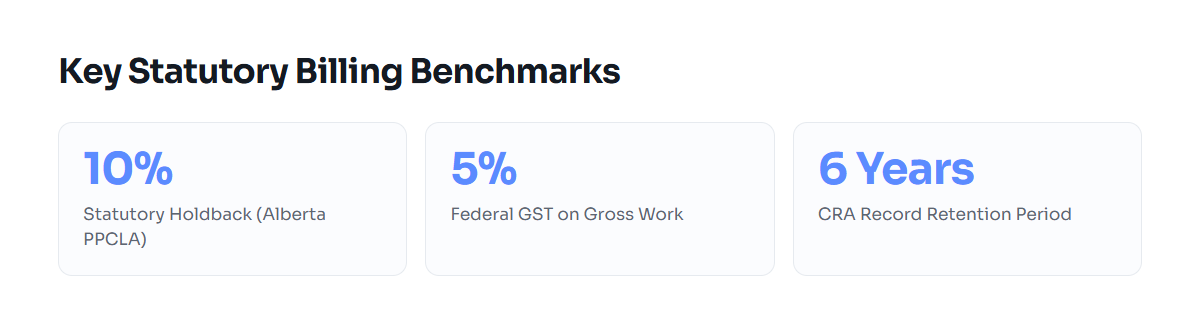
- Holdback deduction: A separate line deducting the statutory construction lien holdback before calculating the net cash due. In Alberta, this is 10% under the Prompt Payment and Construction Lien Act (PPCLA).
- Sales tax breakdown: Tax calculated strictly on the gross work completed, showing the applicable rate for the province where the work was performed.
- Payment instructions: Direct banking details for electronic funds transfer (EFT), direct deposit instructions, or the physical remittance address for cheques.
For a complete breakdown of contractor billing principles across Canada, review our guide to Invoicing and Quoting for Trades and Contractors.
How to Build and Calculate an Excel Progress Billing Sheet
Excel handles basic arithmetic well, but progress billing introduces circular logic risks if your formulas blend tax and holdback in the wrong order. Canadian tax authorities require GST or HST calculation on the gross value of services performed, regardless of statutory holdback deductions retained by the general contractor.
1. Structuring the Summary Table
Set up your workbook with two distinct sections: an itemized schedule of values and a financial summary block. The schedule of values lists each contract item, the original committed value, approved change order values, previous billings, current billing, and remaining balance to complete.
2. The Calculation Order
The financial summary block must execute calculations in this precise sequence to satisfy both provincial lien legislation and Canada Revenue Agency audit rules:
- Gross Work Completed This Period: Sum of current labour, material, and change order line items ($A).
- Statutory Holdback Deduction: Gross Work multiplied by the statutory rate (10% in Alberta, Ontario, and British Columbia). Formula:
=A * 0.10($B). - Net Work Value Payable: Gross Work minus Holdback. Formula:
=A - B($C). - Applicable Sales Tax: Tax calculated on Gross Work ($A), not on Net Work ($C). Under Section 165 of the Excise Tax Act, GST applies to the full consideration for the supply. Formula for Alberta (5% GST):
=A * 0.05($D). You can verify multi-province tax variations with our free GST/HST Invoice Calculator. - Total Amount Due This Claim: Net Work Payable plus Sales Tax. Formula:
=C + D($E).
Worked Number Example
Consider an electrical trade contractor completing rough-in wiring on a commercial tenant fit-out in Calgary, Alberta. The total subcontract is $45,000.00. For Billing Claim No. 02, the subcontractor bills $12,000.00 in work completed during the calendar month.
| Billing Component | Calculation Formula | Amount (CAD) |
|---|---|---|
| Total Approved Contract Value | Fixed base contract + approved change orders | $45,000.00 |
| Previously Invoiced (Claim 01) | Prior gross billing cumulative | $8,000.00 |
| Current Work Completed (Claim 02) | Labour ($7,500.00) + Materials ($4,500.00) | $12,000.00 |
| Statutory Holdback (10% under PPCLA) | $12,000.00 * 0.10 | -$1,200.00 |
| Net Claim Payable | $12,000.00 - $1,200.00 | $10,800.00 |
| GST (5% applied to Gross Work) | $12,000.00 * 0.05 | +$600.00 |
| Total Amount Payable on Claim 02 | $10,800.00 + $600.00 | $11,400.00 |
| Total Cumulative Work Completed | $8,000.00 + $12,000.00 | $20,000.00 |
| Total Cumulative Holdback Retained | $20,000.00 * 0.10 | $2,000.00 |
| Remaining Contract Balance | $45,000.00 - $20,000.00 | $25,000.00 |
To inspect CRA documentation standards before sending your file, refer to our detailed analysis of Contractor Invoice Template for Canada: CRA Rules.
Field Practice: Lien Acts, Inspections, and Prompt Payment
Spreadsheet templates work well for static, single-item billing. On commercial construction sites, however, progress billing interacts directly with statutory timelines, permit inspections, and safety documentation. If you miss a required attachment, your invoice gets rejected, and the payment clock resets.
Alberta Prompt Payment Rules
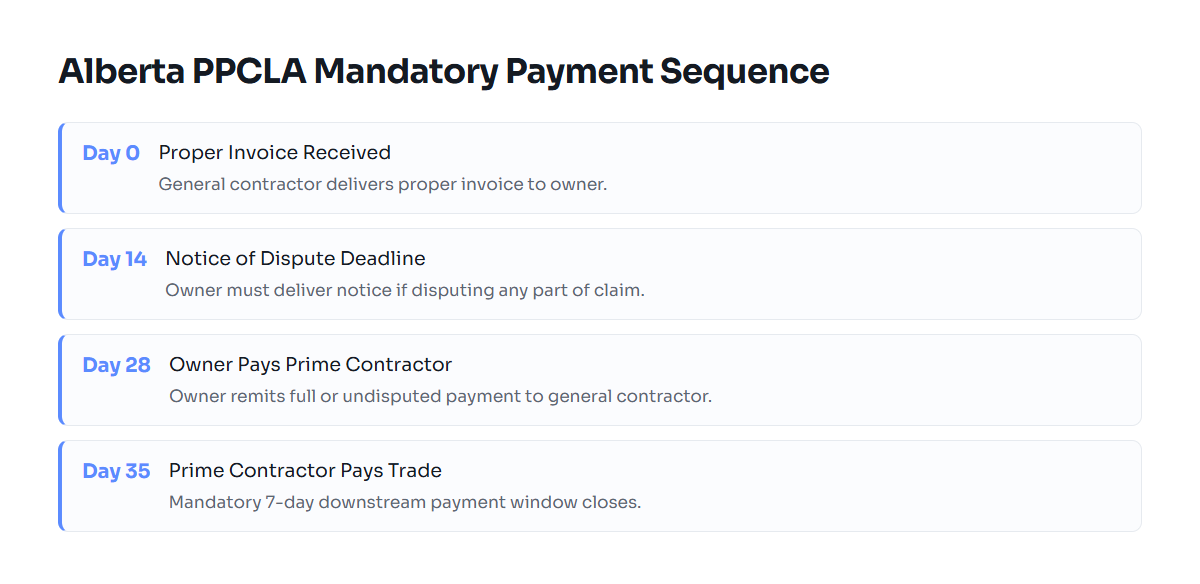
Under the Alberta Prompt Payment and Construction Lien Act (PPCLA), an owner must pay a prime contractor within 28 calendar days of receiving a proper invoice. The prime contractor must then pay its subcontractors within 7 calendar days of receiving payment from the owner (35 calendar days total from the initial proper invoice submission).
For your invoice to count as a proper invoice under Section 32.1 of the PPCLA, your contract cannot make payment conditional on prior owner certification unless your contract explicitly states testing or commissioning terms. If the general contractor disputes an invoice, they must issue a formal Notice of Dispute within 14 calendar days of receipt.
Required Attachments for Canadian Subcontractors
Do not send an Excel file or exported PDF by itself. Most Canadian prime contractors require specific compliance documentation stapled to every progress claim:
- WCB Clearance Letter: In Alberta, obtain an electronic clearance letter from the Workers' Compensation Board (WCB) confirming your account is in good standing. Without this, the prime contractor can withhold payment to cover potential statutory liabilities.
- Statutory Declaration: For progress claims after the first billing, submit a signed Statutory Declaration (such as CCDC 9A or an equivalent provincial declaration) confirming that you have paid your own secondary subcontractors, suppliers, and trade labour up to the date of the preceding claim.
- Permit Inspection Records: If billing rough-in milestones for electrical, plumbing, or HVAC trades, general contractors often require a passed inspection record from the municipal authority (such as the City of Calgary or City of Edmonton safety inspection branches) or an accredited inspection agency.
- Change Order Authorizations: Attach signed copies of change order authorizations. General contractor accounting desks reject any claim where the billed total exceeds the original purchase order value without executed paperwork.
CRA Record-Retention Mandates
Under Section 230 of the Canada Income Tax Act and Section 286 of the Excise Tax Act, you must retain all invoices, receipts, and supporting project documentation for a minimum of six years from the end of the last tax year to which they relate. Storing multiple disconnected Excel workbooks across local desktop folders creates audit vulnerability if files become corrupted or overwritten during year-end reconciliation.
Excel vs Dedicated Billing Software for Trades
Excel gives sole proprietors complete control over formatting without monthly subscription fees. However, as trade operations expand to multiple projects, manual spreadsheet administration introduces distinct failure points.
| Operational Criterion | Excel Billing Spreadsheet | Dedicated Billing Platform |
|---|---|---|
| Upfront Software Cost | Zero (if spreadsheet software is installed) | Monthly or annual subscription |
| Holdback Tracking | Manual cell formulas; prone to broken references | Automated tracking across claims and releases |
| Statutory Payment Timelines | No automated alerting for 28/35-day windows | Automated tracking of delivery and due dates |
| CRA Audit Readiness | Files must be backed up manually for 6 years | Centralized, tamper-resistant document storage |
| Change Order Syncing | Manual adjustment of schedule of values | Integrated tracking tied to original scope |
| EFT / Payment Gateway | Requires manual bank sign-in and cross-referencing | Integrated payment links directly on invoice |
If you bill more than three commercial projects simultaneously, spreadsheet maintenance consumes billable trade hours. The risk of overwriting formula cells or dropping prior holdback figures increases with each progress billing cycle.
Transitioning from Spreadsheets to Systematic Billing
If you run a single trade crew or take occasional commercial subcontracts, an Excel template remains a functional starting point. Ensure your workbook locks formula cells for holdback and GST, and always export a clean PDF version for your customer rather than sending the raw .xlsx spreadsheet.
When your trade volume grows, tracking progress claims, retainage releases, and municipal permit sign-offs across disconnected spreadsheets becomes an administrative liability. Explore BoltBill Pro to automate progress claims, holdback deductions, and prompt payment compliance across all Canadian provinces.
Free tools: GST/HST invoice calculator · hourly rate calculator
Common questions
Do I calculate GST before or after deducting the 10% statutory holdback?
You must calculate GST or HST on the gross value of work completed before deducting the statutory holdback. Under the Excise Tax Act, sales tax applies to the full value of the goods and services delivered during that billing cycle, regardless of retainage.
What happens if my subcontractor invoice does not include my CRA Business Number?
If your gross billing exceeds $30 and you are registered for GST/HST, the Excise Tax Act requires your business number on the invoice. Omission prevents the general contractor from claiming an Input Tax Credit (ITC), which typically results in immediate rejection of your progress claim.
How does the Alberta Prompt Payment and Construction Lien Act affect my invoice due dates?
The PPCLA requires project owners to pay prime contractors within 28 calendar days of receiving a proper invoice. Prime contractors must pay subcontractors within 7 calendar days of receiving owner payment, creating a maximum 35-day timeline from proper invoice delivery.
Can I bill for unapproved change orders on my Excel progress billing template?
Billing for unapproved change orders frequently causes invoice rejection. Prime contractor accounting departments verify line items against executed change documents. Bill base contract progress separately from extra work until signed change documentation is secured.
How long must Canadian subcontractors keep past invoices and receipts?
Under Section 230 of the Income Tax Act and Section 286 of the Excise Tax Act, Canadian businesses must retain all billing records, expense receipts, and contracts for six years from the end of the relevant taxation year.
Related guides
Invoicing and Quoting for Trades and Contractors
A complete Canadian guide to quoting, proper invoices, provincial holdbacks, and prompt payment compliance for contractors, trades, and consulting engineers.
Subcontractor Invoice Requirements in Canada
A complete guide to CRA tax compliance, statutory lien holdbacks, and prompt payment billing rules for Canadian trade and professional subcontractors.
Progress Draw Payments in Canadian Construction
A complete guide to progress draw payments, statutory holdbacks, and prompt payment rules for Canadian contractors and trades.
Contractor Invoice Template for Canada: CRA Rules
A compliant Canadian contractor invoice template meeting CRA GST/HST rules, provincial sales taxes, and Alberta Prompt Payment requirements.